Wednesday, February 25, 2009

Uploading.com Stats and Payment Proofs

Bookmark and Share


Hey Guys .. Here are some stats for a few days in this month .. i m telling ya' , u r missing smthing ... join under me and i can share the secret with you , its not that tuff, its just an 1 hr work in one day .. heh

Stats:


Remember : Join Uploading.com here

Cheers!

Crusher!!

Read more...

Thursday, February 19, 2009

My Strategy for Uploading.com (Tips & Tricks)

Bookmark and Share

First of all , if you haven't yet registered to uploading.com and want to earn some money , i will really advice you to do so, do so by clicking here


Before you read this, make sure u have already read this ..

Ok now that you know about uploading.com, and i m assuming that u have already registered

Today i m going to tell you about my first day at uploading.com, i registered under one of my friend who wanted me to join this service, after a few days of thoughts i said why not try, so i did . then he asked me to get Rapid Share Manager for uploading.com , (read more about it in my previous posts on uploading.com).

All i did is, i went to some site, under the domain i was targetting, ( i targeted photo softwares) , k i went there and i grabbed sm posts under my domain , and grabbed sm rapid share links for the same, put that in the rapid share manager under my uploading.com page, and within a few hours the links were converted into uploading.com links .. now if any1 clicks on the link and downloads the same software, guess who gets paid ?? Me ;) ..

So , all i did was took those links (uploading.com links) and created a post with almost the same description as the post i took it from and started posting the same links, under other forums with the same domain, it is some pain to register under all these forums but if u have an auto form filler like i do it almost makes ur work 20 %, so shudnt be much of a problem,

(Please remember not to post the same software in the site u originally took it from, it may create problems if reported) For this reason i usually keep 1 forum as a donor ... :)

Now, when people look at ur posts and click on it ..and download it .. Walou! You get paid , for providing this link to them, uploading.com's rapid share manager is a real gift, use it to the fullest , make sure u always have things under waiting, You'll be amazed with the amount of money u can earn with RSM,

(I'll be glad to help you guys, but only if you help me by becoming my referrals :D , mail me @ crusher115@gmail.com and i'll give you some better and more specific tips on how things have to be done)

Once Again , If you want to register, do so by going here

Cheers!

Comments Welcome ,

CRUSHER ! !

Read more...

Tuesday, February 10, 2009

YouTube Tips & Tricks

Bookmark and Share

Hey Guys,

I've collected a few articles on How to Increase the traffic on YouTube and get maximum Traffic and How to Maximize your earning on You Tube:

Here they are...

Maximize Your Earning!


Increase the Traffic !

I'll keep posting more about them ..

Cheers !

Crusher ! !

Read more...

Increase the traffic on you YouTube Videos

Bookmark and Share


Aside from YouTube, blogs are the most viewed marketing mediums on the web. Blogs are useful for marketing everything when you use a little bit of imagination, but those blogs that allow for embedding of video are especially useful when it comes to increasing YouTube traffic.

Sites like Blogger and PNN are free to use and offer the ability to embed videos from YouTube. People who use those sites often browse through others' blogs as well and when they find an interesting video, they often embed it into their own blogs. PNN is a fairly new social networking/blog spot, but it is growing rapidly. If you do it right, your videos may receive dozens of views in just a day or two and if you continuously update your content, you will soon be rewarded with increased YouTube traffic.

Keep in mind that a blog is not very interesting if all it contains are embedded videos without any other content to go with it. A blog that contains only embedded video is akin to slapping an ad on a page and calling it a post. Take the time to write about the niche and summarize the content of the videos you are promoting. Visit other blogs that relate to your own content and leave honest comments to posts. If you are courteous and able to offer real feedback, other bloggers are more likely to leave your comments on their blogs.

Blogging is by no means the only way to increase YouTube traffic but it is of too much value to ignore. Signing up on free blogs is easy and there are no reasons for not utilizing them in YouTube and other marketing campaigns.

Read more...

Earn with YouTube !

Bookmark and Share


Here, I found an interesting article on the web on How to earn with Youtube!


So you want to learn how You Tube Videos can help you to earn money online? You Tube has grown in popularity over the last few years, as more Internet Business owners are utilizing the free service to send traffic to their website. However, like any online marketing tool there are some right and wrong ways to getting the most out of your video.

The most fundamental thing you must do is outline what your reasons for uploading a video to You Tube is. While some videos are posted by amateurs looking for laughs, or fifteen minutes of internet fame. Internet Business owners can use this service to earn money online by driving traffic to website, get sales messages to potential buyers, and to marketing product or services. No matter your reasons you want to make sure that your Video is seen by the right target audience.

Once you establish your reasons for uploading a video you want to make sure that your video is seen by the right target audience. What is the most common way a website is seen? The search engines. The powerful search results of Google or Yahoo. While many marketers dispute the fierce competition of SEO. You Tube doesn't have the same competition, however in order to earn money online with video it should be optimized the right way to get the optimal results.

Before you upload a video here are steps to make sure that you get the right target audience.

1.) Keyword Research - In order to earn money online you have a target market that you want to see your videos. Find out what keywords are popular for you market.

2.) Research other You Tubes - You Will notice some incredibly high hits to videos. Why did those videos work. Was it really the quality of the video. Or was the video optimized right. Pay attention to the thumbnail picture, title, keyword tags, and view count of the videos.

3.) The Tags and keywords - It appears in order to get the most out of your video. The tags are the most important keyword reference to optimize your site.

4.) Quality of Tags - Use multiple tags to get the most out of your visitors. When you are setting out to earn money online, there are several methods that your target market will find you. Don't just stick with a couple of tags use as many to have your market finding you.

5.) Your Title - Make sure that your title has more then one keyword. It is known to help people in the search results find you. Use some thought in your title.

6.) Organize your data - As you are finding the most relevant keywords keep data. Sort by date added, view count, rating and the power of the keyword. In order to know if your You Tube video is allowing you to earn money online must track your progress. Even if you first video is not perfect and could be better, you can always learn from that first video. Note: Even if your first You Tube Video Bombs don't get rid of it. Just add a new one and learn from your previous mistakes.

You Tube has become one of the biggest website growths on the Internet. It is now in the top five biggest web properties in the world. You Tube has become one of the biggest online marketing tools, allowing Internet Business Owners to earn money online. I am sure you are ready to upload your first dynamic video. Create that stunning new video, just make sure you take the time optimize and get the most out of your keywords.

Read more...

Sunday, February 8, 2009

Earn Double with Shared Images & Linkbucks

Bookmark and Share

Watch the Tutorial Video to understand how can you use SharedImages & linkbucks together to earn double than what you would otherwise


Cheers !

Crusher!!

Read more...

How to add You Tube Video on Blogspot

Bookmark and Share

Want to add YouTube videos on ur blogger/blogspot blog?

Watch this Tutorial


Cheers !

Crusher

Read more...

Saturday, January 31, 2009

Blogging - Tricks & Trips

Bookmark and Share

Hey guys..

I've collected some useful blogging trips and tricks which have atleast helped me a lot...

Here are a few of those:

Playing with Widths :
It will teach you to make the width of the sidebars and the main bars according to your liking

Creating Drop Down Menus
Great find! .. Helped alot .. the name says it all ..

The Header
All about designing your blog's header..

RSS and Entrecard
Best way to Generate and keep up the traffic of ur blog

Changing Blog's Background
It'll help you change your blog's background

Hiding the Navigation bar
It helps you to hide the nav bar when u move your cursor away from it .. great find ..

Adding YouTube video on ur blog
a great way to add videos in ur blog

Enjoy ...

Crusher!!

p.s. Will Keep adding .. so make sure u subscribe .. :D

Read more...

Friday, January 30, 2009

Creating Drop Down menus in your Blog!

Bookmark and Share

Here is small code to create a drop down menu in blogger beta.

Step 1. Copy the code below in a note pad and replace link1.com, link2.com etc. with the destination page, and link1 and link2 with the name of the respective destination. If you want to insert more links just copy and paste (removing all underscores"
<_option value="http://link1.com">link1<_option value="http://link2.com">link2<_br>before this tag --> <_/select>
after doing this your code is ready.

start copying the code below this line
<_br/><_select onchange="javascript:window.open(this.options[this.selectedIndex].value);"><_option value="">My Blogroll<_option value="http://dollars-online-free.blogspot.com">Crusher's Blog<_option value="http://link1.com">link1<_option value="http://link2.com">link2<_/select>"

code copy ends above this line.

Step 2. Log on to your blogger beta account and in blog settings go to template tab and then click "Page element" tab

(Click images to enlarge them)

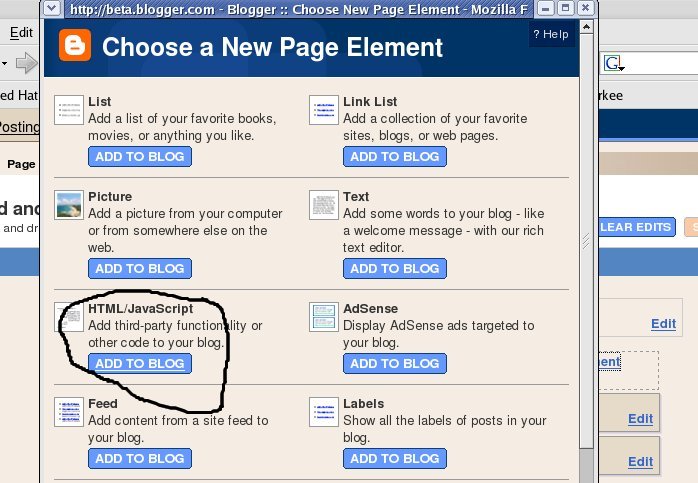
Now click "Add a page element" and then choose HTML/Javascript page element

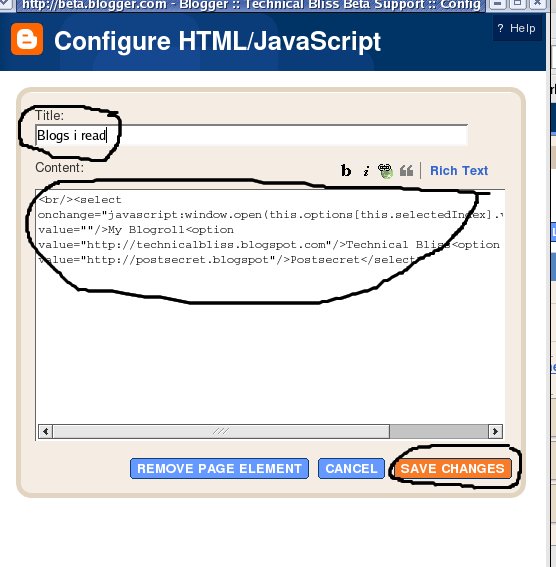
Now enter the title what ever you like. (i've entered Blogs i read) and in palce of content add the code which you have copied and modified in the notepad in step 1.

Now click "save changes"
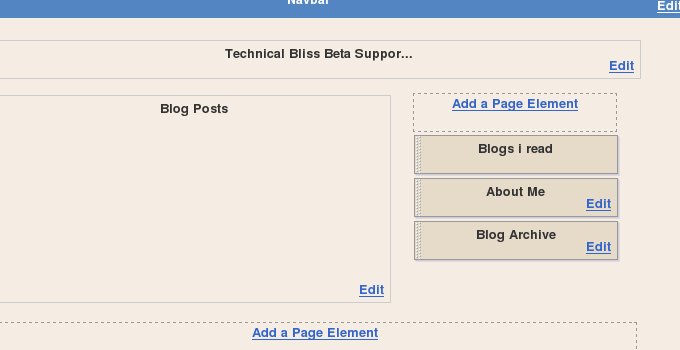
Now you can see a new element is added in your layout.( see the image below)

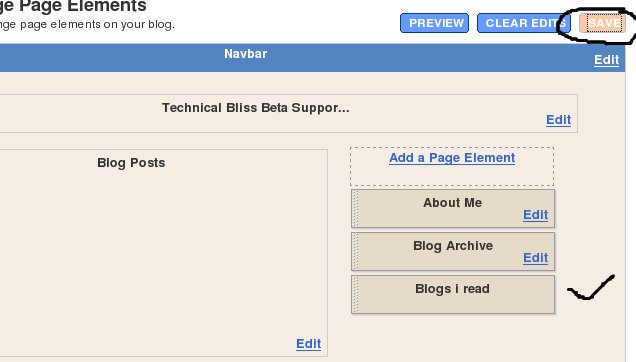
Now drag and drop the element ( i.e Blogs i read) where ever you want it to be. ( Like i've put it below my blog archive)


Click "save" button and work is done.
your drop down menu will look like this.


If you have any problem, feel free to ask me...

Read more...

Playing with widths

Bookmark and Share

Once again assuming that you have the Minima Template (though this one will work for any template):

You may wish to increase (or decrease) the widths of your header, your main post area of your side bar. Here is how to do it:

1. Back up back up back up your template by clicking Layout > Edit HTML > Download Full Template

2. Find

#header-wrapper {
width:1120px;

Change the number (in red) to whatever width you want, experiment and play with it until you get it exactly how you want it! This (not surprizingly controls the width of the header)

3. Find

#outer-wrapper {
width: 1120px;

This is going to control the width of the entire page: The width of the main posts column + the width of the side bar(s)... typically this should be the same as the header width (unless you are planning to do something really funky with the header :))

4. Find

#main-wrapper {
width: 600px;

This controls the width of your main post area

5. Find

#sidebar-wrapper {
width: 400px;

This (obviously) controls the width of your side bar

Again see to it that width of main-wrapper + width of sidebar-wrapper is almost equal to width of outer-wrapper (in my blog i have left a 20 px gap, so they are a bit seperate, you need not and can make it exactly equal)

You can play about with these numbers until you have the widths of your blog exactly the way you want them!

If you have more than one side bar, find #sidebar2-wrapper { to modify the next one... note that the second or more sidebar could be named differently in different templates... so just searching for sidebar and pressing next would work best.

Enjoy...
Cheers!

Crusher!!

Read more...

The Header

Bookmark and Share

The Header is perhaps the most distinctive part of your blog at first glance... So, spending some time on making a really nice header goes a long way in improving the look and feel of your blog.

Of course you could design it yourself or download it from somewhere or whatever...

It should end up as a jgp file on your computer :)

Once you have it, it's very simple:

1. Click customize and get into page elements. Click the edit button on the header element. You will get a pop up like this:

So, choose the appropriate placement, and the shrink to fit button, upload the image there from your computer. Press Save and you are almost done usually.

View your blog... if the header seems a bit out of place, you may need to tweak the outer wrapper width values... (i will post how to do that in a few days, otherwise just play around with the code under edit HTML... it's quite easy to find the numbers you need to change, ALWAYS remember to download and keep a copy of your template, just in case things go wrong) if you like those 2 lines around the header (assuming you are using the minima template) leave them in, or simply change their colour to the background colour from the Layout/fonts and colour change page.

Cheers!

Crusher!!

Read more...

RSS and Entrecard

Bookmark and Share

It will be great if you guys can burn an RSS feed with feedburner and add it to your blog.

What's RSS? Watch the video,


Competition: A well written tutorial with screen shots etc will get published here with back links to your blog and 50 Entrecard credits to your Entrecard account. What's Entrecard? Find out here. Just remember that you will need an RSS feed from feedburner on your blog before your Entrecard will work for you.

Enjoy ..

Crusher!!

Read more...

Change Blog's Background

Bookmark and Share

Again, i am assuming you are working with the Minima template and using firefox 3:

First off, we will change the background:

The extremely tough part:

You will need to choose a background for your blog. There are many ways of doing this:

You could go here and choose any image and download it in jpg format (they are already in jpg format on this site). You can search for textured background, or floral background and check out the sites that come up... You could simply scan a pretty paper or crumpled fabric or whatever and save it as a jpg on your computer. It's important to save it as a jpg on your computer. But you should have figured that out by now...

Now go to your account on photobucket. You did create it, didn't you?. If you didn't, create one, store your user name and password somewhere safe, etc etc. Upload the jpg image there. You should have a screen looking something like this one once you upload it:


Now we get to the easy part...

1. Click on Customize on your Navigation Bar (Look at the top right of your blog)
2. Click Layout
3. Click Edit HTML
4. Put a check mark on the Expand Widget Templates box (not needed, but its a good habit)
5. Click Download Full Template (ALWAYS do this before attempting anything please)

If you start to scroll down in the box where the HTML stuff is written, after the first section of comments and things you will come across a lot of "Variable Definitions". Directly after that you will see:

body { background:$bgcolor
etc etc (you will not see the etc :))

Alternatively you can search for body{ and it will highlight on your screen. Press command+f on a mac or ctrl+f on a (ugh) PC, and type whatever you want to search for on a page, if it's there, the cursor will jump to that place and highlight it. Nifty trick huh?!

Now you remember that thing we had copied off earlier from photobucket? Paste it in so that it reads as:

body {
background: url(http://i284.photobucket.com/albums/ll11/xyz/xxx.jpg);

Basically you are going to paste in the url of where your image is...

So, the syntax is

body { background: url(http://your-image-hosting-service.com/image.jpg);

Notice that the ( brackets need to close. and remember to put the ; at the end of the line.

And you are done!

If you preview your template now, you will have the background set as the image of your choice tiled without overlap or anything!! BUT Your text will be superimposed on the image. This can be great if you are using a really big picture of some landscape for example. But usually it just becomes unreadable.


So we go to the next step of changing the background colour of the place where you are posting.

Find #outer-wrapper {

Under it, look for the line starting with the word background, replace it with

background: #CC9966;

If that line is not there, simply add the above line right below #outer-wrapper {

So it will look something like this:

#outer-wrapper {
width: 660px;
background: #CC9966;
margin:0 auto;
padding:10px;
text-align:$startSide;
font: $bodyfont;
}

As usual the blue is what was already there, the green is the modification

Note: That #CC9966 is a hexadecimal number (if you don't know what that means, attend a Mathemagic workshop with me) representing a colour. You can use numbers 0-9 and letters A-F to experiment with the different colours it makes, it always has to have 6 characters there though... or you could head here and see what codes are for which colours.

Once you have put in the colour code you want, preview the template and see how it looks. Play around till satisfied...

Save template and voila, a brand new look!!


Please send me screenshots of before and after from your own blog... You can send them to crusher115@gmail.com

Next week, we are going to play with making the post area and the sidebar bigger (or smaller)... Do you like the new Header and the expanded size of the post area? Possibly, we will also learn how to make a better header... If you see the changes happening here, know that the tutorials for the changes are coming soon :)

I am ready to design custom headers for your blogs. I will be charging Rs 2000 or USD $7 for it. You need to tell me exactly what you want, and I will do it. I can be contacted at crusher115@gmail.com


Enjoy!

Crusher

Read more...

The Vanishing Nav Bar

Bookmark and Share

I am assuming that you have chosen the Minima template...

This is a very simple hack, basically what it does is makes that ugly navigation bar at the top of your blog vanish... but if you hover your cursor near the top, the bar will magically re appear... Try it at the top of this blog and see if you like the effect for your own blog!

Ok, here is what you do:

1. Click on Customize on your Navigation Bar (Look at the top right of your blog)
2. Click Layout
3. Click Edit HTML
4. Put a check mark on the Expand Widget Templates box (not needed, but its a good habit)
5. Click Download Full Template (ALWAYS do this before attempting anything please)

Ok, now if you start to scroll down in the box where the HTML stuff is written, after the first section of comments and things you will come across a lot of "Variable Definitions"

It will look something like this:

/* Variable definitions
====================

type="color" default="#dd9" value="#aa8833">

type="color" default="#333" value="#000000">

type="color" default="#684" value="#ffff66">

type="color" default="#874" value="#ffffcc">

type="color" default="#a83" value="#aa8833">

type="color" default="#c80" value="#ffffcc">

there will be a lot more of this too...

Immediately following this will be:

body {
background:$bgcolor;
margin:0;
color:$textcolor;

and so on...

You need to cut and paste the next 2 lines of code just before body{

#navbar-iframe{opacity:0.0;filter:alpha(Opacity=0)}
#navbar-iframe:hover{opacity:1.0;filter:alpha(Opacity=100, FinishedOpacity=100)}

so that it looks like this:

#navbar-iframe{opacity:0.0;filter:alpha(Opacity=0)}
#navbar-iframe:hover{opacity:1.0;filter:alpha(Opacity=100, FinishedOpacity=100)}

body {
background:$bgcolor;
margin:0;
color:$textcolor;

The green is what you have pasted in, the blue is what was already there...

Just in case you are wondering, you don't need to make it that colour. I have used the colours just to make things clearer :)

Click the Orange button bottom right: Save template

Click View Blog, and voila!! Your Navigation Bar will have started doing it's vanishing act!

I have used this from a hack i saw at Bloggeratto's

Enjoy...


Crusher!!

Read more...

Tuesday, January 27, 2009

UserCash - Share Links & Get Paid

Bookmark and Share

This summary is not available. Please click here to view the post.

Read more...

HyperLinkCash - Join, Post Links & Earn

Bookmark and Share


Another service I found as an alternative to Linkbucks.
With HyperLinkCash.com you will make money from every click on link that You posted on Your blogs, forums, websites. The only thing you have to do is generate new links our system and replace your old links.

KEY FEATURES :

We pay our members 70% revenue share.
Automatic link generator.
Current rate : 1800 hits = $1
900 clicks from United States, United Kingdom, Canada, France, Germany, Spain, Italy = $1
Advanced, real time statistics.
We pay for traffic from any country.
Weekly Payouts with just $1 minimum.
We pay you through PayPal
Dedicated affiliate support.

Okay, So why do you think I posted this when there is a better service, called, Linkbucks?
Firstly, HyperLinkCash has only 1 Ad-type, and that is Intermission. In Linkbucks, you need to wait for 15 seconds or you need to click on "Skip This" In order to move to the destination link. However, on HyperlinkCash, you always need to click on "Skip This" In order to move forward. Not tempting enough?
Well, Here's what's interesting. Linkbucks pays 1$ / 2000 clicks per every Intermission AD (from US/UK/Canada). But HyperLinkCash pays $1 / 900 clicks for same ad and same countries!! Now that's really tempting. It can increase your earnings by almost as twice.


That's why I posted about HyperLinkCash. So, if you want your intermission ad-type links to get you more revenue, You should go for this.

Join Now!


Read more...

SharedImages - Show Images to People & Earn $$$

Bookmark and Share


SharedImages, as the name says, lets you earn when you share your pictures with others!

If you are a regular gallery poster, or if you upload mass pix everyday on various sites, this is the place. With SharedImages, when you share the images with others, you earn money.

To start working with shared Images,

1) Go to SharedImages website
2) Register yourself
3) Upload some pictures of any kind by going HERE
4) Now After you have created an album, post on forums, give to your friends, and try to spread as much as you can!

-4.1) Types of Images

--4.1.1 SFW - Safe for work

In this, anything which is not "adult", "nude" and the likes can be uploaded. Like Funny pix, Models, Celebrities, and can even be your own pets!

--4.1.2 NSWF - Not Safe For Work

This includes all the porn, and the likes which majority of the net surfers like to watch. Nice way of earning money in this step.


That's about how to start earning. Now to tell you about how much you can earn from SharedImages


As a good beginning, you will be able to earn 1USD when signup and 1USD for each of 1000 visitors. Minimum payment is only 5 USD

The minimum balance required for payout is only 5 USD. If you don't want to receive money so frequently, you could accumulate more money before request.

After you request your earnings, your earnings will be sent to you via E-Gold, Liberty Reserve, ePassporte or PayPal.


Best place to post your Albums is in forums/websites which get their major traffic from US/UK
That's right. Shared Images has tied with up with following countries to get you maximum revenue.

Tier level Countries/Regions
Tier_1 United States; United Kindom; Canada; Australia;
Tier_2 Germany; Franch; Spain; Austria; Belgium; Denmark; Finland; Sweden; Switzerland; Netherlands; Italy;
Tier_3 Japan; Hong Kong; Taiwan; India; Korea (North); Singapore; Russia;
Tier_4 All countries/regions except above;

So, as you can see, best place to post is where there is maximum traffic from 1st Tier countries.


That's about SharedImages!

Pros: Good Earning from this website. 1$ bonus for joining
Has 3 different Image hosting links

Cons: None as of now.

MyRating: 5/5

Join Now!

Read more...

DepositFiles ---> Upload ---> Earn

Bookmark and Share


DepositFiles - is a popular international service for safe file's transfer, storage, and distribution. The size of their servers, working on several gigabyte Internet channels, is nearly unlimited. Today, there is no other similar service that can offer you this level of quality. DepositFiles is the best and quickest service of uploading, storing, and safe forwarding of your files on the Internet.


DepositFiles service options
  • Free storage of your files on the servers for any period of time,
  • Downloading files from slow servers to their server and their storage for any period of time,
  • The largest possible size of stored file is 2Gb!,
  • The total size of the stored files is unlimited,
  • Sending free emails with downloading link for your file to all your addressees,
  • Password protection for your file's downloading,
  • They delete your file at any time that is convenient for you,
  • Easy file downloading at any time that is convenient for you.

So what you waiting for? Combined with linkbucks, sharedimages / imagereverb/ imagefap, and you can earn tons of $ a day !!

Click Here to JOIN

Read more...

Monday, January 26, 2009

PayPal - The Best Way for Receiving Payments on the Web

Bookmark and Share

Sign up for PayPal and start accepting credit card payments instantly.

What is PayPal?

The lowest-cost, broad-featured system I've found for receiving payments on the Web is PayPal -- and it doesn't require a merchant account or payment gateway. What's more, many international merchants can use it with relative ease to sell products in US dollars. With its integrated shopping cart feature, it is finally mature enough for small online merchants to use to launch low cost e-commerce sites.

PayPal began in 1999 as a tool for transferring money for payment in eBay auctions and is currently the most popular online payment system of its kind. PayPal estimates that it is the payment vehicle for 28% of the auctions that close on eBay, with its closest competitor used for only a small fraction of that. Essentially, the system allows a PayPal member to e-mail money to anyone, though to retrieve the money the recipient must set up a free PayPal account for himself or herself. To date, PayPal boasts more than 8 million members, which account for a considerable fraction of those who make purchases via the Internet.

Why Choose PayPal?

  • Free to Send Money : Pay for purchases or send money to anyone with an email address in 190 countries and regions. It's free.
  • Accepted Worldwide : PayPal is accepted by thousands of businesses worldwide and is the preferred payment method on eBay.com.
  • Easy to Sign Up, Easy to Use : Signing up for a PayPal account is easy, and takes just a few minutes to complete. Once you're done, you can send your payment in minutes
I use PayPal for almost all the transactions i do on the internet,

Click here to Join Now!

Read more...

myLot - Earn while you discuss

Bookmark and Share


What is myLot?

myLot is a unique and fun online community filled with members from all over the world discussing topics of everyday life. myLot is a place where members can discuss whatever is on their mind. Whether you want to discuss sports, ask a question on how to find a job, get advice on dating, or just want to talk about what is bothering you, myLot is here for you!

How Do I Use myLot?

You must register as a member. Click here to create a myLot account.
Once you have registered and become a member of myLot, you can start a new discussion or respond to any existing discussion.

How Do I Start A Discussion?

To start a discussion, go to the myLot homepage.
Enter the topic or subject of your discussion in the “What's on your mind?” box.
Enter the details of your discussion in the box below. Be sure to include all pertinent information to help others understand your topic. Pertinent information may include your country and state, specific name of item describing, and make and model information.
Click “Start Discussion.”
Once your discussion is posted, other users will be able to view your discussion and reply to you with their answers, advice, opinions and comments. If upon registration you selected to be notified to new responses an email will be sent to you once a new response has been posted.

How Do I Respond To A Discussion?

To reply to other members discussions, click on “respond to this discussion.”
Enter your response, and click “submit.”
You can also comment on any user's response by clicking on “add comment.”
Enter your comment in the box.
Click “submit.”

That was about myLot. Now to tell you how and how much you can earn from myLot.

How to Earn Money ?


1. Ask lots of questions

Whenever other people reply to your discussions then you will earn money.
As well as earning money from simply posting your own discussions and responses. You wont be paid for leaving comments though.
Search for unique and interesting topics and come up with a good question that will encourage participation. Make sure your question hasn't already been asked before and remember the more responses to your question the higher the earnings could be.

2.Respond to discussions and comments.

Answer and respond to as many discussions and questions as you can. It's stressed that you should answer in as much detail as possible at least three to four sentences long. It could be helpful to use the same keywords as in the discussion question.

3. Upload images

MyLot pays you for each image uploaded.
You can upload for each response and at least double any earnings.

4. Fill in your interests.

It's an important part of MyLot because when you post a discussion in the same topic as your interests then MyLot will pay more. So it's well worth taking the time to fill in all your interests.

5. Enlist referrals.

This is one of the most important to multiply your earnings. MyLot will pay you 25% of the earnings of your referrals. When they earn $1, you will earn $0.25. Not all referrals will actively take part in MyLot regularly but the more referrals you have higher earnings you'll receive.

So, How much can I expect to earn from MyLot?

The potential earnings are as follows;

$0.1 - $0.3 per discussion or response.
$0.1 per image upload.
25% of referral earnings.

However, all earnings are calculated until payment time and your earnings are dependent upon your level of participation.

Most people generally participate with up to 100 responses to discussions per month, while others commit up to 30 responses per day.

Your earnings and your referrals earnings are really up to you.

Are there any other benefits of joining MyLot?

Yes, there are, please read on..

The MyLot friends feature allows you to control your messages so you don't receive any unwanted messages from other users or spam.

You can register your blog within MyLot and gain exposure for your cause.

* Other positive points.
* Safe environment
* Self-regulated network
* Ability to search for specific discussion topics.


For more benefits, sign up and get started!.


To Summarize Mylot.

I'd say that Mylot can give you some very unique and personal answers to topics and discussions.
MyLot really does aid in people helping one another in a constructive way.
I don't think many will become rich from Mylot but for participating in something fun, interesting and getting paid to do so is fine by me.

Click here to Join Now !

Read more...

Inbox Dollars - Sign up and You get 5$, WOW

Bookmark and Share


From my personal experience...

Here is my review of InboxDollars, a money making opportunity. From my personal experience, this is a great opportunity to earn some extra money online.


Pros


(1) Free to join


(2) $5.00 bonus for joining


(3) You can start earning right away. Once you join, InboxDollars sends you a confirmation email, then you can instantly start earning money and monitoring your earnings on their site.


(4) Excellent customer service- You can submit tickets via their website. I have submitted tickets, and in a day or two, I will get a response. Everyone of my tickets has been responded to.


Ways to Earn Money

(1) Reading emails - Receive 3 cents for each email viewed (with a few clicks, you can earn). It is not much, but it only takes 5 seconds.


(2) Cash Surveys - You earn the max of $1.00/day for doing one (that is $30.00 per month!). Surveys are even available on weekends. This is where I make a majority of my earnings.


(3) Trial Offers - You can sign-up for trial offers (they range from free 7-day trials to 30-day trials, depending on the merchant). For example, I earned $10 for trying eFax, and canceled it within the 30-day trial, and did not pay anything for eFax, and still received $10 from InboxDollars (2 days after I signed up for the trial).


(4) Complete Offers - Receive anywhere from $0.50 to $1.50 for completing offers (i.e. signing up for other survey programs, signing up for free information, etc.)


(5) Cash Shopping - This means if you are planning on purchasing something online anyway, see if the merchant is listed under InboxDollars - and you will receive 1-20% back for clicking on the merchants website from InboxDollars). You are still ordering directly from the merchant's site, basically you were just referred to them via InboxDollars.com portal).

  • For example, I personally received $2.15 back for ordering printer ink, which I was going to order anyway, and found a very cheap deal through InboxDollars.com

(6) Cash Games - You can earn cash back for playing games. I have never tried this.


(7) Make Money Through Referrals - You can refer a friend and make money.


Cons


(1) Takes 30 days to process a check (but as of 1/1/2008, you become a Gold Member after you request a check, and your checks will then be processed weekly).


(2) $3.00 free to request a check (not out-of-pocket, this fee is taken from your earnings).


Keep your account active - Make sure you keep your account active (check the emails Inbox Dollars sends you). In my experience, they only send you a handful a week


How to Get Paid

When you account reaches $30.00, you can request a check for a $3.00 processing fee, or let your money grow. I wanted to see if I would actually receive a check, so I requested a check for $30.00 as soon as my account his $30.00 (which I did). My second check was for $56.00. This was over a 2-month period.

  • Now I am letting my account grow a little higher, since I trust InboxDollars so very much!

Conclusion – Sign up!

You can also receive more money if you refer others, so if you decide to sign-up (and since I took the time to write this review), could you please sign-up using my referral link (below)?


Sign-up for InboxDollars!!


Thank you and happy earning! $$$

Read more...

Linkbucks- Best Way to Earn Online

Bookmark and Share


Linkbucks is one of the most popular ways of earning online.


Take a look at this tutorial Video


After watching the video, You have learnt that:

You need to copy a link, convert it into linkbucks, and post it into forums where people shall click on your link and get you $$.

With Linkbucks you can make easy $5 a day to even 50$ a day.


Click here to Join: Join NOW!


More about Linkbucks and It's Features


Getting Started

Getting Started Icon


Linkbucks is easy to use. Just create a paying link, paste the code on your website, and watch the money add up as people click on your links.
The following is a brief explanation of some of the features in LinkBucks. To get started right away, just click on the “Create Links” tab (once logged in) and generate your first paying link!


Bullet Point Create Links

There are 3 ways to create links that get you paid...


...and 3 types of ad styles available to choose...


1. Intermission

Intermission ads show up before the page you linked. Since these ads bring more views, you get paid more per view. These ads will forward the viewer to the target link after 5 seconds or the instant they click on the “continue” button.


2. Top Banner

Top Banner ads are displayed in a small top frame above the site you are linking to. They are completely unobtrusive and stay in a top frame above the target site until the viewer closes the frame.

3. Popup Ad

If you select this, Ads are displayed with a popup window.


...and finally, 2 types of target ads.


It is important to select the correct age appropriate group that the page you are linking to is targeted to. This will protect clean sites from ads with adult content.
1. Clean

If the page you are linking to is safe for all ages, just choose the “clean” option. This will ensure that the ads displayed will be appropriate for all ages.

2. Adult

If the page you are linking to contains any adult content, you may choose the “adult” option. This will allow adult targeted ads to be displayed.


Your Earnings are calculated on the basis of:


1) Site Traffic - Best traffic to get your links clicked from is US/UK/Canada.
2) Ad type - Best ad type is Intermission, since it pays the highest. But you cannot use Intermission everywhere.
3) Your Performance Score - This depends on where you get the traffic mostly.

Linkbucks has tied up with following countries:


Tier level
Countries/Regions
Tier_1 United States; United Kindom; Canada;
Tier_2 Germany; Franch; Spain; Austria; Belgium; Denmark; Finland; Sweden; Switzerland; Netherlands; Italy;
Tier_3 Japan; Hong Kong; Taiwan; India; Korea (North); Singapore; Russia;
Tier_4 All countries/regions except above;

Hence, A linkbucks link containing Ad type of Intermission, clicked by US/UK/Canada people will get you 1$ per 2000 clicks. Now that's awesome and I love it. So you have to find out places to get your links clicked by 1st Tier countries. However, you cannot use adtype Intermission everywhere. Suppose you convert a link to a Picture/Image or to a gallery, of course people will get pissed waiting for 15 seconds before viewing another image. Here, you will use the adtype "Popup" Since people will NOT have to wait for the image, and also, even if they use pop up blocker, you will still get credited :)
Here, a link clicked 2500 times by 1st tier countries with your adtype "popup" will get you 1$ . (In case of Intermission, it was 1$/2000 clicks)

Read more...

Join MyPTC Site - Best Guide to Earn Money through PTC Sites

Bookmark and Share


MyPTCSite is a guide, resource- and community site for PTC site admins and people who are about to start up their own Paid To Click site. Here you learn about running a site and how to make it profitable. Really profitable!

We do not only provide you with the basics here.. we reveal advanced marketing methods on how to use your PTC site to make money from other websites and create multiple sources of income. Your PTC site will be your main tool.


This knowledge makes the difference between success and failure.
This also makes the difference between earning $100 per month or $10,000 per month!
Our test site generated between
$8,000-$10,000 every month ...after expenses.

You also learn about scripts and how to catch cheaters and hackers.

On the forum you can get in touch with other PTC admins to get help and advise. Our staff is available to help out as well.

For coders and designers there are great opportunites to sell your scripts and designs in our Marketplace.

Subscribe Now


Read more...

Sunday, January 25, 2009

Tips for Google AdWords

Bookmark and Share

Top 12 Tips To Writing Effective
Google AdWords Select Ads

By Michael Wong


In this article I show you my top twelve tips for creating effective Google AdWords Select ads [https://adwords.google.com/select/].

I've been testing the Google pay per click advertising system for a while, with much success. These tips will help you create ads that generate higher click through rates, and lower cost per click.


1. Target The Right Audience

Target the right audience by selecting the language and countries that you want to target. For example, I exclude all countries where English is not understood by a large percentage of the population.


2. Refine Your Keywords

Use square brackets "[...]" around your keyword/s.

For example:

[google]
[google adwords]

Your ad will only show when the search is for the exact keyword phrase you have included within the brackets.

The ad will not show for searches that include other keywords. In our example, this would be for searches such as "google search," or "google news."


3. Test Multiple Ads Simultaneously

Always test 2 (or more) ads simultaneously. This is what is known in the print industry as an A/B split test.

Find out which one produces the higher click through ratio. Then replace the weaker performing ad with a new one.

Continue this process in your never-ending quest to get the highest click through ratio possible.


4. Track The Return-On-Investment Of Each Ad

Google tracks the click through ratio of each ad. But it doesn't track the conversion ratio.

Use a special tracking link in each ad to track its conversion ratio. For example, you could attach each ad with an affiliate tracking system link. Make sure each ad produces a return-on-investment.


5. Include Targeted Keywords In Your Ad

Include the targeted keywords in the headline and the description of the ad. Google will highlight searched keywords in bold in the ad.

When people scan search results, they look for the keywords they have entered. Searched keywords highlighted in bold certainly help to catch the user's attention. For this reason, ads with searched keywords usually perform better than ones without.


6. Sell The Benefits

Spell out one or more major benefit in your ad. For example, make more money, stay younger looking, lose weight, get healthier, live happier, etc.


7. Include Attention Grabbing Words In Your Ad

Start your headline with an attention grabbing word. For example, "Free:, New:, Sale:, etc." Make sure you stay within Google's editorial guidelines
[https://adwords.google.com/select/guidelines.html].


8. Use Words That Provoke Emotion & Enthusiasm

Use power words or call-to-action phrases that provoke emotion, enthusiasm and a response.

Here are some examples of power words:

free, cheap, sale, special offer, time limited offer, tricks, you, tips, enhance, discover, fact, learn, at last, free shipping, etc.

Here are some examples of call-to-action phrases:

* Buy Today - Save 50%
* Download Free Trial Now
* Sale Ends Tomorrow

Make sure the phrase specific to your business, otherwise Google may reject the phrase.


9. Sell Your USP (Unique Selling Proposition)

What makes your product or service better, or different, from the competition? Spell them out in your ad.

For example, one of Amazon.com's first taglines was "Earth's Biggest Bookstore." That's a powerful USP!


10. Link To Relevant Landing Pages

If an ad is for a specific product or service, create a landing page for the ad. Include relevant and useful information to convert the customer. Generally, a well designed landing page will almost
always convert more visitors than if you simply sent the visitor to the home page.


11. Remove Common Words

Remove common words, such as "a, an, in, on, it, of, etc." Remove every word that does not absolutely need to be in the ad. Make every word count.


12. Deter Freebie Hunters

Deter freebie hunters by including the price of the product or service at the end of the ad. This will improve your overall conversion ratio and lower your average customer acquisition cost.

This may reduce your click through ratio, but that's OK. After all, you're not trying to target every body, only potential customers. In most cases, freebie hunters will never become paying customers.


Conclusion

Remember that advertising is a never-ending series of tests. Always track your ads. Never stop testing different keywords and ads to improve your conversion ratio and lower your customer acquisition cost.

Advertising in Google's AdWords Select [https://adwords.google.com/select/] advertising system works. It may not necessarily produce as many visitors as Overture, but the click through cost can be lower.

Master the art of advertising in Google, and you could outsmart the competitor who's always outbidding you in Overture.
[http://www.overture.com] ;o)


Read more...

Best Strategy for NeoBux

Bookmark and Share


Hello everyone,

I believe that NeoBux is still one of the best paid to click programs out there. They do one thing consistently and that is they pay instantly. They seem to have a clear business model and show a level of sustainability that you normally do not see. Some people complain that it is not easy to make a lot of money with NeoBux and they are right. But with the right strategy it is not hard to make a good amount of money consistently without the worry of the company disappearing tomorrow. You need to pick a strategy and stay with it for the long haul with Neobux. With a few minutes a day you can really generate a nice income stream with NeoBux. Below, I have my strategy for those that are just starting out with NeoBux.

1. Choose a time of day that you can click ads and eventually manage your referrals at the same time everyday.

2. Click all available ads everyday (when you get referrals this is necessary to earn from referral clicks).

3. Utilize all free methods of advertising to gain any direct referrals. Talk it up with your friends and relatives. Put a tagline on your e-mail signature. Post in forums. Use free traffic exchanges.

4. Once your account balance reaches $2. Transfer this money to your rental balance and rent 3 referrals. It is only $0.90 to rent the referrals but you will need the remainder to properly manage the referrals.


5. Put the autopay function on.

6. If a referral of yours has not clicked today or yesterday and has click average of less than 2.0 then recycle it ($0.08) and get a new referral. If they have a click average of between 2.0 and 4.0, I will give them 4 days before I recycle them. I will give those with an average of over 4.0 seven days to return and click just because I would hate to recycle a great referral just because they were on vacation for a week.

7. Whenever, one of your referrals goes below 20 days before next payment pay to add another 30 days. Below 20 days, the autopay function does not work and you will not get the savings for that referral.

8. Every time your account balance reaches $1 transfer the money to your rental balance. At first when you are only making a couple of cents per day it is important to keep enough in your rental balance to maintain your recycling activity because you can only transfer in $1 increments. Once you can complete this transfer and have at least $2.40 in your rental balance rent another 3 referrals.

9. Continue this process until you are making a $1 a day in your account balance. At this point you can begin renting in bigger chunks of referrals every 7 days. Never rent a number of referrals that is greater than 33% of your existing totals as these will become difficult to manage through recycling with your earnings.

10. It will take a while but continue the above listed process until you reach 500 referrals. At this point stop renting and just maintain your referrals. Accumulate the earnings until you can pay for the upgrade to golden.

11. Once golden, maintain your referrals as before. Every week continue to rent referrals until you hit the 2000 refs mark. Any money that you are not sinking into referral maintenance or renting is profit for you.


This is the way I manage my account and I have had really good results. The aggressive recycling is very key.


Source: myLot Discussion

Read more...

Clickbank, a profit machine

Bookmark and Share

For the new Internet marketer, the term Clickbank may very well mean nothing more than a snap purse with a number of major credit cards tucked nicely away. Clickbank is actually the largest affiliate marketplace on the Internet. While there is no way that we can possibly give you all that you need to know about Clickbank in this article, hopefully, it will give you a decent idea of what to expect from this affiliate giant and your quest for Internet marketing greatness.
Clickbank is really the affiliate marketer's dream come true. Back in the early days, if you wanted to sell one of your products online, you have to get your own merchant account and credit card processing. For new businesses, this was very hard to do with no credit history. It was rare to get credit for doing more than $1,000 in sales a month until you built up a reputation as a reputable business. The reason for this was because credit card companies were afraid of refunds for newer businesses, should their products or services not be up to par. Needless to say, this made it very hard for the new businessman on the Internet to get anywhere. Well, Clickbank came to the rescue.
They first set up shop in 1998. Their purpose was simple. They established themselves in order to give new businesses a vehicle through which to sell their products and services. Today, the Clickbank Marketplace has over 10,000 products and services listed. They handle all the collecting of monies to be paid for these products and services and cut vendors checks twice a month, unlike the credit card companies that pay you every 30 days.
Having said all that, there is really more to Clickbank than just collecting payments for you product or service and paying you twice a month. Clickbank is also a home where those who want to promote other people's products can go. As was stated about, there are over 10,000 products listed in the Marketplace so each affiliate has plenty to choose from. Sign up with the company, in order to become an affiliate is easy, and Clickbank's tracking system is one of the best on the Internet.
The problem with Clickbank is that there are a number of regulations that both vendors and affiliates need to be aware of. Weeding your way through the Clickbank website to try to figure all this out can be a time consuming process. Fortunately, there is a resource in my signature box that will tell you all that you need to know about how Clickbank runs so that you'll be prepared for doing business with them. This way you won't make the same mistakes many people make that end up costing them hundreds, if not thousands of dollars.
Clickbank really is a gold mine. You just have to know where to find the gold and how to use it.
To YOUR Success,
Article Source: http://EzineArticles.com/?expert=Steven_Wagenheim

Read more...

Upload and Make Money ( Uploading.com )

Bookmark and Share


Uploading.com pays you to upload files and share with others. It's much much better than easy-share or depositfiles since it pays 10$ for 1000 downloads. It pays for all countries as well. You can also upload rapidshare files directly on uploading.com using remote upload manager.


Payout is 30$ and you can get paid through Paypal, Webmoney, Wire Transfer, ePassporte, Epese etc. I found out it's really better than deposit files and others .. through which people are trying to make money from. I would recommend this instead of depositfiles and easyshare. Cheers.

Have a look at the tutorial video:


Features Include:


Remote Upload Manager - This is a cool feature which lets you upload files directly from another source. Good for files around 70 mb~. However, you cannot upload files exceeding 100 mb (you need to go premium for that). Just use the remote upload manager, add as many links you want, wait for few hours, and it's all done ^_^


Rapidshare Manager - With this, you can directly upload rapidshare files, without needing to have a rapidshare premium account !! Now that's a sexy feature which dragged me. File size doesn't matter, and since rapidshare allows upto 200 mb / file, similarly with Uploading, you can remote upload rapidshare files upto same MB!!


Whoever needs access to this feature (It's not there, you have to apply for it), Please go to Uploading.com Forum and Apply there.


Sales Feature - Since free users are not allowed to download content more than 150 MB, and if they are eager to download something you posted, they can go premium by registering for a premium account on uploading.com and whatever plan they chose, you get HALF of uploading's sales!! Now this is another unique tempting feature.


Also, if you can get 20 sales everyday, be it for small or big plans, you can send an email to uploading staff, and you can get 20$ per 1000 downloads (instead of 10$ per 1000). Twice as much as a normal member's earnings!!

What all countries are included?


$10 for 1000 downloads from US, CA, UK, DE, FR, IT, ES and AT

De = Germany
FR = France
IT = Italy
ES = Spain
AT = Austria


$5 for 1000 downloads from RU, NL and GR

RU = Russia
NL = Netherlands
GR = Greece

Added from 22/01/2009:
PT - Portuguese
CH - Switzerland
SE - Sweden
FI - Finland
NO - Norway
DK - Denmark

$2 for 1000 downloads from PL, CZ and UA.

PL - Poland
UA - Ukraine
CZ - Czech Republic

You can also use this uploading tool to upload your files by downloading the software from here- Click!

Payment Proofs


Check this Out:

149823493.jpeg


Join Now

Read more...
Trace my IP address